One plugin, one shortcode – and your visitors can make a donation directly from your site. No custom payment system, no data storage, no complicated setup. In version 2.0.0, the form additionally supports toggleable modes: one-time donation and monthly donation.
WordPress 5.0+ · PHP 7.4+ · Requires an active fundraiser on ofiaruje.pl
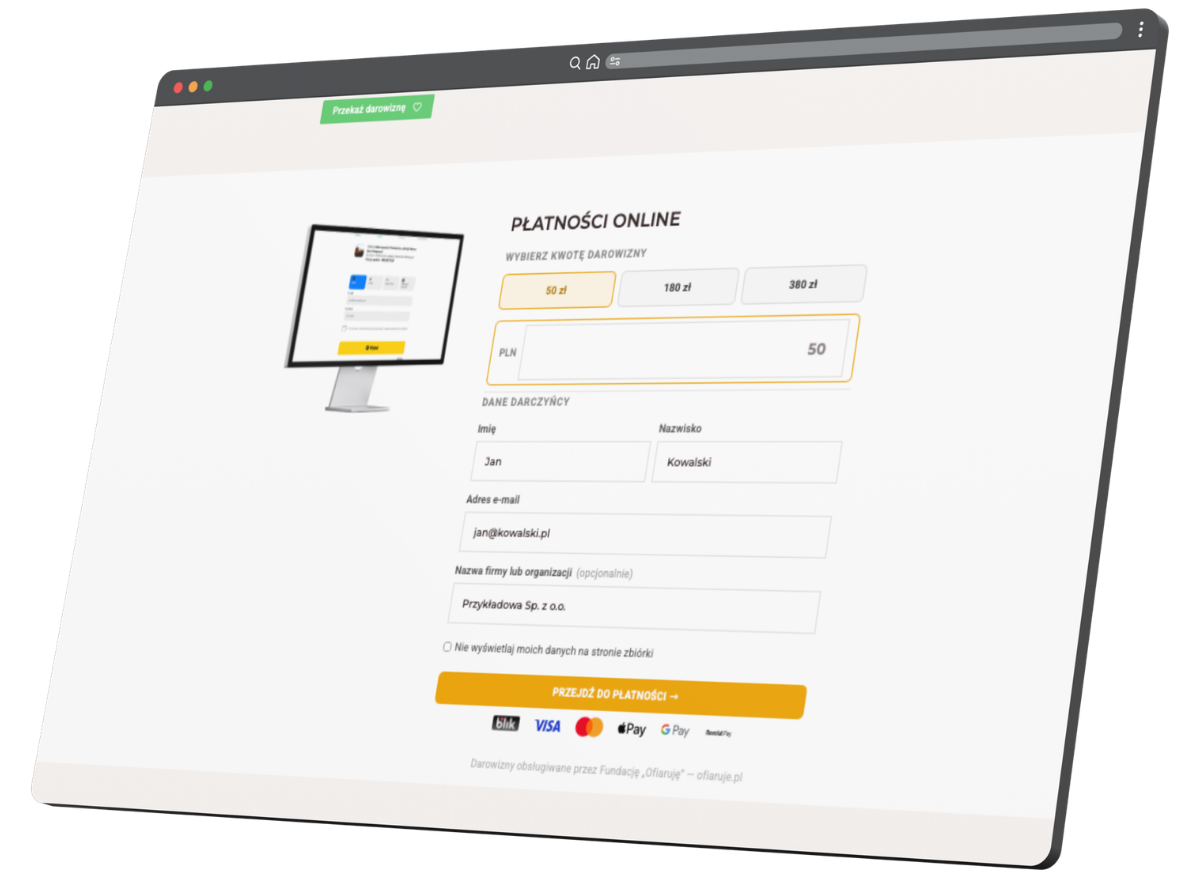
[ofiaruje_formularz]
What do you get?
💳 Ready-to-use donation form
Predefined amounts as clickable buttons plus a custom amount input field. Minimum of 20 PLN enforced on both client and server side.
🔒 Zero data in WordPress database
The form submits data via the POST method directly to ofiaruje.pl. No donor data is ever saved in your database.
🎨 Full appearance control
Built-in CSS panel with a preview and a button to restore default styles. Customize the form to match your site's visual identity.
🔁 Two donation modes (v2.0.0)
"One-time donation" and "Monthly donation" tabs at the top of the form. For monthly donations, fields for street, city, postal code, and country are available.
📊 Built-in UTM tracking
One toggle switch and five fields (source, medium, campaign, term, content) – full campaign tracking without extra analytics plugins.
👁 Donor anonymity option
Checkbox to hide donor details on the public fundraiser page – no changes required on your end.
💰 Payment method icons
Automatically loaded SVGs: BLIK, Visa, Mastercard, Apple Pay, Google Pay, Revolut Pay – displayed below the CTA button.
How does the form work?
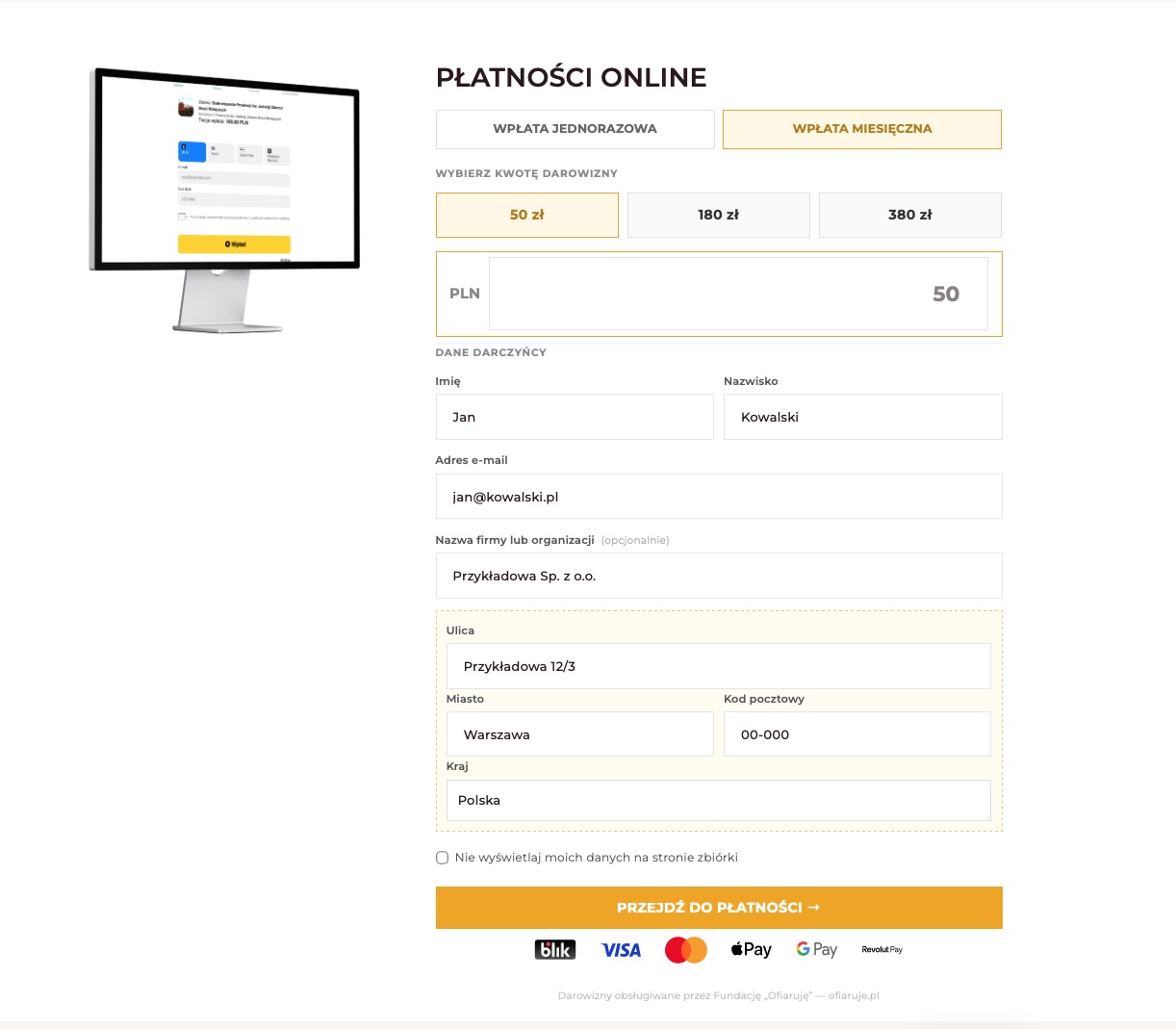
What the donor sees on the site
- Tabs: "One-time donation" and "Monthly donation"
- Predefined amount buttons (e.g., 50, 100, 200, 500 PLN)
- Input field for any custom amount (minimum 20 PLN)
- Fields: First Name, Last Name, Email address (all required)
- Company/Organization Name field (optional)
- In monthly mode: street, city, postal code, and country (default: Poland)
- Checkbox "do not display my details on the fundraiser page"
- CTA button "Proceed to payment →"
- Row of supported payment method icons
What happens after clicking?
- The form validates data in the browser
- Data is sent via POST directly to ofiaruje.pl
- The donor is redirected to the ofiaruje.pl payment page
- The transaction is processed by Stripe
- No data is saved in WordPress
Installation
- Go to the GitHub repository: github.com/janlekszycki/ofiaruje-donation-form
-
Download the ZIP package:
- Releases (recommended for stable releases)
- Code → Download ZIP (current version from the main branch)
-
Ensure the archive contains the directory
ofiaruje-donation-form/. - In your WordPress dashboard, go to Plugins → Add New → Upload Plugin.
- Select the downloaded ZIP and click Install Now.
- Activate the plugin.
- Go to Settings → Ofiaruje and enter your Fundraiser ID.
[ofiaruje_formularz]
onto any WordPress page or post – the form will appear
automatically.
Configuration
Go to Settings → Ofiaruje in your WordPress dashboard and fill in the fields:
| Setting | Description |
|---|---|
| Fundraiser ID required |
Fundraiser identifier (_id) from the
Ofiaruje.pl platform. Visible in the URL:
ofiaruje.pl/f/<ID>
|
| Predefined amounts (PLN) |
Comma-separated amounts, e.g., 50,100,200,500.
Minimum value: 20 PLN. Smaller amounts are
automatically skipped.
|
| Platform URL |
Defaults to https://ofiaruje.pl – usually doesn't
require changes.
|
| UTM tracking |
On/Off toggle switch. When enabled, adds
utm_*
parameters to the form URL (/d?fid=…).
|
| UTM Source |
Defaults to wordpress. Identifies traffic source.
|
| UTM Medium | Defaults to plugin. Identifies channel. |
| UTM Campaign | Optional marketing campaign name. |
| UTM Term | Optional campaign parameter (e.g., keyword). |
| UTM Content | Optional campaign parameter (e.g., creative variant). |
| Custom Form CSS | CSS editor panel preloaded with default plugin styles. You can freely modify them and reset using the Set Default button. |
| Payment icons below button |
On/Off toggle switch showing a row of icons: BLIK, Visa, Mastercard,
Apple Pay, Google Pay, Revolut Pay. SVG icons are loaded
automatically from the assets/ folder.
|
| Donation types visibility | Two toggle switches: separate for "One-time donation" and "Monthly donation". Both modes are enabled by default. |
| Default donation type | Select initial form mode (one-time/monthly). This option only works when both donation modes are enabled. |
Security
No data storage
The form sends data via the POST method directly to ofiaruje.pl. Donor data never reaches the WordPress database.
Input data sanitization
All setting values are sanitized
(sanitize_text_field, esc_url_raw,
absint).
HTML output escaping
All HTML output is properly escaped
(esc_attr, esc_html,
esc_url).
Requirements
- WordPress 5.0 or newer
- PHP 7.4 or newer
- Active fundraiser on ofiaruje.pl
Ready to install?
The plugin is free, open-source, and publicly available on GitHub.
Version 2.0.0 · GPL v2 License